


Rewatch LIVE: Save Live Stream
3.655.00 Reviews
App Specs
- Version
- 1.0.28
- Updated On
- License
- Free
- Downloads
- 100,000+
- Developer
- Reactish, LLC
- Categories
- Tools
- Platform
- Android
Screenshots
 Analysis by AppCompare
I tend to think about live-stream recording as a timing problem, not simply a storage problem. A stream can happen while I’m commuting, working, or asleep, and a replay is only useful if I can find it again and watch it at a convenient time. Rewatch LIVE: Save Live Stream is aimed at that gap: it is a free tools app from Reactish, LLC for people who want to return to live content after the broadcast. That focus is appealing, but it also means I’d treat it as a companion to a streaming service rather than a replacement for the service itself.
Getting Started with Rewatch LIVE
Before building a routine around it, I’d check whether the particular stream I care about can actually be handled by the app. A recording tool is only useful when it works with the source I use, and compatibility matters more than a polished home screen. I would test it with a low-stakes broadcast first, then confirm that the saved result is accessible in the way I expect. That small trial can prevent a disappointing surprise when a one-time event is over.
My basic workflow would be simple: identify a live event, open the app before it begins, and use the available recording option for that stream. Afterward, I’d check the saved item rather than assuming that a recording completed just because I started it. For a short broadcast, this is a quick habit; for a long event, it is worth checking that the phone has enough free space and a reliable connection. Those checks are not glamorous, but they are sensible safeguards for any recording workflow.
Downloading and installing Rewatch LIVE: Save Live Stream on my smartphone was a breeze. Available on both Android and iOS, the app is aimed at anyone who wants more flexibility around live content. Its current version is 1.0.28, and the minimum operating system requirement is 8.0. The app is rated for Everyone, though I’d still think about the age suitability of the streams a person chooses to save and watch.
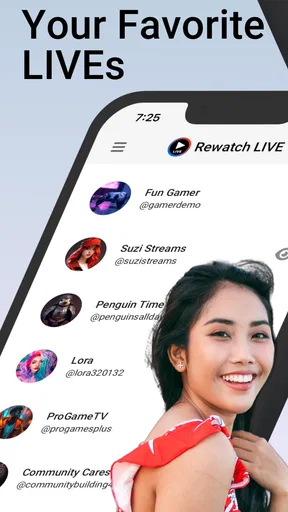
Upon opening the app, you’re greeted with a simple dashboard that allows you to search for live streams or connect to your favorite streaming platforms. The app supports a wide range of streaming services, so whether you're into gaming, music, or live events, there's something for everyone.
Build a Reliable Baseline Routine
I’d use a repeatable checklist for broadcasts I genuinely don’t want to miss: check the event time, open the app ahead of the start, make sure the phone is ready for a long session, and verify the result afterward. The point is not to turn watching into a chore. It is to avoid relying on memory at the exact moment a stream begins, especially when the event overlaps with an everyday commitment.
A realistic example is a student who follows a creator’s live discussion but has a class at the same time. The practical approach is to prepare before leaving, then check later whether the recording is available and watch it when there is time to focus. A similar routine works for a music performance or a work-related broadcast that may contain a useful explanation. For anything important, I would not make the app my only plan: if the platform offers an official replay, I’d keep that option in mind too.
Worth Reading Before You Choose

EA SPORTS FC Mobile 26 Is a Bigger Football Game, but It Takes Time

Flipboard Shows What News Apps Must Do Beyond the Feed

Switching to Android Auto Means Rethinking Your Driving Routine

Google Calendar Makes a Crowded Week Easier to Manage

Ludo King Makes the Most of the Minutes Between Plans

Baby Panda World Brings Quick Play to Modern Phones, but Its Game Library Feels Busy
Settings and Small Checks That Matter
Rather than assuming that every recording will suit every situation, I’d explore the controls the app actually presents and make a short test capture. The useful questions are practical: can I locate the saved stream afterward, does it play properly on my device, and is the viewing experience acceptable on my connection? A quick test also helps reveal whether I need to adjust my own habits, such as starting earlier or closing unrelated tasks before a long broadcast.
Storage is another consideration that is easy to overlook. A few short recordings may be manageable, while repeated long events can become a burden on a phone. I’d review saved items after watching and remove anything I no longer need, rather than letting a collection grow without purpose. If I’m planning to keep a recording for a while, I’d also check that it remains available where I expect it to be; I would not assume that a saved stream automatically becomes a permanent archive.
The app is free to download, with in-app purchases listed from $8.99 to $44.99 per item. I’d begin with the free experience and decide whether any paid option is worthwhile only after I understand how well the app fits my routine. The important trade-off is personal: occasional users may not need to spend anything, while someone who depends on repeat access should first make sure the app’s actual workflow meets that need.
Faster Habits for Regular Viewers
If I were using it often, I’d make the process easier by pairing the app with habits I already follow. For example, I could check a creator’s schedule when planning my week, then open the app as part of preparing for a broadcast instead of waiting until the last minute. I’d also keep my saved recordings tidy, using whatever organization the app makes available rather than letting unrelated events become a confusing pile.
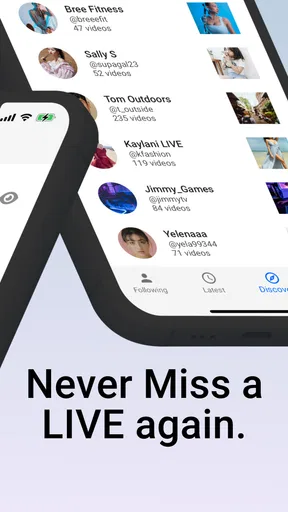
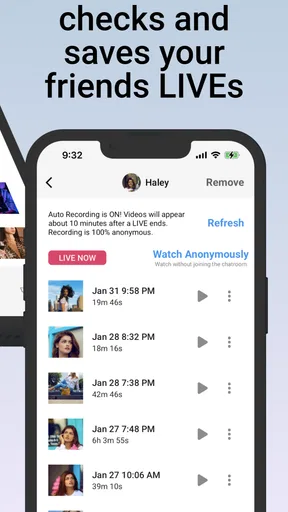
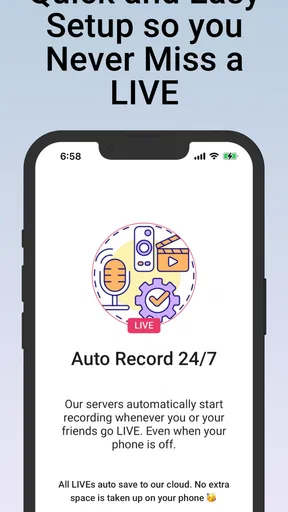
The app’s store summary describes automatic recording of friends’ live broadcasts, while its short description emphasizes watching live content again. That makes it most interesting to someone who follows particular people and wants a way to catch broadcasts they miss. It is less compelling if I only watch occasional streams and the platforms I use already provide dependable replays. In that case, the platform’s own replay feature is likely the simpler first choice.
Compared with ordinary screen recording, a purpose-built live-stream tool sounds more directly suited to this particular task, but I would still judge it by the result rather than the label. A general screen recorder can be useful when I need to capture what is visible on my own phone, yet it may require more manual timing and attention. Rewatch LIVE is worth considering when I want a workflow centered on returning to live broadcasts; it is not a reason to assume every platform or stream will behave identically.
Features You’ll Love
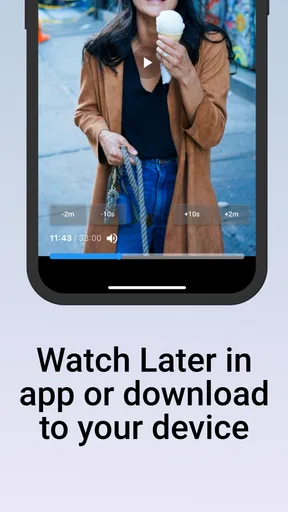
One of my favorite features is the ability to save live streams directly to my device. This means I can watch them offline whenever I want, without worrying about buffering or internet connection issues. For someone who travels a lot, this feature is an absolute lifesaver.
The app also offers a nifty feature where you can set reminders for upcoming live streams. This ensures I get a notification before the event starts, so I can tune in live if possible. If life gets in the way, I know I can always catch up later thanks to the app’s recording feature.
Another cool aspect is the customizable watch list. I can organize my saved streams into categories, making it super easy to find exactly what I’m in the mood for, whether it’s a tech conference replay or last night’s gaming showdown.
How It Performs
Performance-wise, the app is smooth and reliable. I haven't experienced any crashes or major bugs, which is a massive relief. The recordings are high-quality, capturing the stream just as it aired live, without any loss in audio or video quality.
The app runs efficiently in the background, so you can continue using your phone for other tasks without any lag. Plus, it doesn't hog battery life, which is always a plus in my book.
Where I’d Be Cautious
Recording a live broadcast depends on more than the app alone. The stream itself, the phone’s available space, and the stability of the connection can all affect whether the experience matches what I want. I’d avoid starting a lengthy recording with a nearly full device or an unreliable connection, and I wouldn’t promise myself an offline copy until I had checked that a test recording worked as expected.
There is also a difference between saving something for convenience and keeping it indefinitely. A recording can be useful for reviewing a lecture or catching up on a missed conversation, but I would not treat it as a substitute for a creator’s official archive. If I need a permanent reference, I’d look for an authorized replay or another source intended for long-term access. That is a more dependable choice than building an important workflow around a copy whose availability I have not checked.
Rewatch LIVE has an average rating of 3.6 from 544 ratings, alongside 46 written reviews, and it has passed 100K installs. I read those figures as a reason to approach it with realistic expectations, not as a verdict on whether it will suit me. The right test is whether it works with the streams I follow and whether the saved playback is convenient on my device. I’d try it on a broadcast I can afford to miss before trusting it with a one-off event.
Why You Should Try Rewatch LIVE
In a world where live streaming is becoming more prevalent, Rewatch LIVE: Save Live Stream fills a necessary gap. It's perfect for anyone who values flexibility in how and when they consume live content. Whether you're a busy professional, a student, or just someone who loves staying in the loop, this app ensures you're never out of touch with your favorite streams.
Overall, I’m thoroughly impressed with this app. It’s user-friendly, efficient, and packed with useful features that cater to the needs of modern streamers. If you haven’t tried it yet, I highly recommend giving it a shot. With Rewatch LIVE, missing out is no longer an option.
So go ahead, download the app, and take control of your live streaming experience. You’ll wonder how you ever managed without it!
My Take for Different Kinds of Viewers
I’d recommend it most to people who follow a small set of live creators and regularly have schedule conflicts. The value is clearest when there is a specific broadcast I care about, a reason I cannot watch live, and enough time afterward to catch up. It may also suit someone who wants to revisit a useful section of a stream, provided the saved recording can be navigated comfortably for that purpose.
I’d skip it if I rarely watch live content, if the platform I use already keeps replays in a reliable place, or if I need a guaranteed recording for work or study. In those cases, an official replay or a recording method built into the source service may be safer and simpler. I’d also think twice if I do not want to manage saved video on my phone, since any recording habit brings a little housekeeping with it.
Rewatch LIVE is a focused tool rather than a universal answer to every problem around live video. I’d start with one ordinary stream, learn the steps that work on my device, and keep expectations tied to that tested workflow. For viewers who often miss broadcasts and are willing to check their recordings, that modest routine can make live content much easier to fit around real life.
Pros
- Easy to navigate interface for all users.
- High-quality video recording capabilities.
- Supports multiple platforms for convenience.
- Allows scheduling of stream recordings.
- No time limit on saved recordings.
Cons
- Requires stable internet for best results.
- Limited editing tools for recorded videos.
- Subscription needed for premium features.
- Occasional app crashes on older devices.
- Large app size may affect storage space.
FAQs for Rewatch LIVE: Save Live Stream
What is Rewatch LIVE: Save Live Stream, and how does it work?
Rewatch LIVE: Save Live Stream is an app designed for saving and watching live streams from various platforms. It allows users to capture live broadcasts, store them, and replay them at their convenience. The app supports multiple streaming services and provides an easy-to-use interface, making it simple to navigate and manage saved streams.
Is Rewatch LIVE: Save Live Stream compatible with both Android and iOS devices?
Yes, Rewatch LIVE: Save Live Stream is available for both Android and iOS platforms. Users can download it from the Google Play Store for Android devices or the Apple App Store for iOS devices. The app is optimized for a wide range of devices, ensuring smooth performance across different operating systems.
Does Rewatch LIVE: Save Live Stream offer any in-app purchases or subscriptions?
While Rewatch LIVE: Save Live Stream is free to download, it offers in-app purchases and subscription options. These may include premium features like unlimited storage, advanced editing tools, and ad-free experience. Users can choose to upgrade based on their needs and preferences, enhancing their overall experience with the app.
How secure is the data stored on Rewatch LIVE: Save Live Stream?
Rewatch LIVE: Save Live Stream prioritizes user privacy and data security. The app uses encryption protocols to protect stored videos and personal data. However, users should always ensure they are using the latest version of the app to benefit from the most recent security updates and features.
Can I share saved live streams with others using Rewatch LIVE: Save Live Stream?
Yes, Rewatch LIVE: Save Live Stream allows users to share saved live streams with friends and family. The app provides sharing options through social media platforms, email, or direct messaging. Users can easily select the streams they wish to share and choose their preferred method of sharing directly from the app.


